Schema Types and Benefits
Schema Type Comparison
Different schema types serve different purposes. Understanding their strengths helps you choose the right approach for your data needs.
JSON Schema
Best For: API validation, JSON data contracts, web applications
Benefits:
- Human-readable format
- Wide tool support
- Rich validation capabilities
- Easy to learn and use
Limitations:
- Larger file size compared to binary formats
- No built-in versioning
- Limited support for complex types
Avro Schema
Best For: Data pipelines, message queues, schema evolution
Benefits:
- Compact binary format
- Built-in schema evolution
- Efficient serialization
- Strong typing
Limitations:
- Less human-readable
- Requires Avro runtime
- More complex than JSON Schema
Protobuf
Best For: High-performance systems, microservices, gRPC
Benefits:
- Very efficient binary format
- Fast serialization/deserialization
- Strong typing
- Language-agnostic
Limitations:
- Less flexible than JSON
- Requires code generation
- Steeper learning curve
Relational Schema
Best For: Structured data storage, SQL databases, transactional systems
Benefits:
- Mature and well-understood
- Strong consistency guarantees
- Powerful query capabilities
- ACID compliance
Limitations:
- Less flexible for unstructured data
- Scaling challenges
- Schema changes can be disruptive
Document Schema
Best For: Flexible data structures, content management, semi-structured data
Benefits:
- Flexible structure
- Easy to evolve
- Good for nested data
- Horizontal scaling
Limitations:
- Less strict validation
- Potential for data inconsistency
- Query limitations compared to SQL
Choosing the Right Schema
Consider these factors:
- Data Structure: Is your data structured, semi-structured, or unstructured?
- Performance Needs: Do you need maximum performance or flexibility?
- Evolution Requirements: How often will your schema change?
- Tool Ecosystem: What tools and platforms are you using?
- Team Expertise: What schema formats does your team know?
Schema Costs and Performance
Understanding the costs associated with different schema types helps you make informed decisions about which schema format to use for your use case.
Maintenance Costs
Maintenance costs include the time and resources required to keep schemas up-to-date, handle migrations, and ensure compatibility.
JSON Schema
Maintenance Complexity: Low to Medium
- Schema Updates: Easy to modify and version manually
- Migration Effort: Low - changes are human-readable and easy to track
- Tooling: Extensive tooling available, but requires manual coordination
- Team Overhead: Minimal training required
Example: Updating a JSON Schema to add a new optional field requires:
- Editing the schema file (5 minutes)
- Updating documentation (15 minutes)
- Testing validation (30 minutes)
- Total: ~1 hour per schema change
Avro Schema
Maintenance Complexity: Medium
- Schema Updates: Requires understanding of Avro compatibility rules
- Migration Effort: Medium - built-in evolution support but requires careful planning
- Tooling: Schema registry tools help but add complexity
- Team Overhead: Team needs to understand Avro compatibility
Example: Adding a new field with default value:
- Schema update (10 minutes)
- Compatibility verification (20 minutes)
- Registry update and coordination (30 minutes)
- Consumer updates (varies)
- Total: ~1-2 hours + coordination time
Protobuf
Maintenance Complexity: Medium to High
- Schema Updates: Requires code regeneration and deployment
- Migration Effort: High - breaking changes require careful versioning
- Tooling: Code generation tools required
- Team Overhead: Higher learning curve, requires understanding of field numbers and wire format
Example: Adding a new field:
- Update
.protofile (10 minutes) - Regenerate code for all languages (30 minutes)
- Update all services (1-2 hours)
- Deploy and coordinate (varies)
- Total: ~2-4 hours + deployment coordination
Scalability Considerations
Different schema types scale differently as data volumes and complexity increase.
Small Payloads (< 1 KB)
Example: User profile data (name, email, preferences)
| Schema Type | Serialization Time | Deserialization Time | Payload Size |
|---|---|---|---|
| JSON Schema | ~0.1ms | ~0.15ms | ~800 bytes |
| Avro | ~0.05ms | ~0.08ms | ~600 bytes |
| Protobuf | ~0.03ms | ~0.05ms | ~500 bytes |
Recommendation: For small payloads, JSON Schema offers the best balance of readability and performance. The overhead of binary formats may not be worth it.
Medium Payloads (1-100 KB)
Example: E-commerce order data (items, customer info, shipping details)
| Schema Type | Serialization Time | Deserialization Time | Payload Size |
|---|---|---|---|
| JSON Schema | ~1.5ms | ~2ms | ~45 KB |
| Avro | ~0.8ms | ~1ms | ~32 KB |
| Protobuf | ~0.5ms | ~0.7ms | ~28 KB |
Recommendation: Avro and Protobuf start showing significant advantages. Consider binary formats if you’re processing thousands of messages per second.
Large Payloads (100 KB - 10 MB)
Example: Complex data contract with nested structures, arrays, and metadata
| Schema Type | Serialization Time | Deserialization Time | Payload Size | Memory Usage |
|---|---|---|---|---|
| JSON Schema | ~25ms | ~35ms | ~2.5 MB | ~5 MB |
| Avro | ~12ms | ~18ms | ~1.8 MB | ~3.5 MB |
| Protobuf | ~8ms | ~12ms | ~1.5 MB | ~3 MB |
Recommendation: Binary formats (Avro, Protobuf) provide substantial benefits:
- 30-50% smaller payloads reduce network bandwidth
- 2-3x faster serialization/deserialization
- Lower memory footprint for processing
Very Large Payloads (> 10 MB)
Example: Data warehouse exports, bulk data transfers, analytics datasets
| Schema Type | Serialization Time | Deserialization Time | Payload Size | Throughput |
|---|---|---|---|---|
| JSON Schema | ~500ms | ~700ms | ~50 MB | ~100 MB/s |
| Avro | ~200ms | ~300ms | ~35 MB | ~250 MB/s |
| Protobuf | ~150ms | ~220ms | ~30 MB | ~300 MB/s |
Recommendation: Binary formats are essential for large payloads:
- Protobuf offers best performance for very large datasets
- Avro provides better schema evolution for changing requirements
- JSON Schema becomes impractical due to parsing overhead
Computational Costs
Computational costs include CPU, memory, and network resources required for schema validation and data processing.
Validation Overhead
JSON Schema:
- CPU: Medium - requires parsing JSON and applying validation rules
- Memory: Higher - full JSON object must be in memory
- Network: Higher - larger payload sizes
- Example: Validating 10,000 records/second requires ~2 CPU cores
Avro:
- CPU: Lower - efficient binary parsing
- Memory: Lower - compact binary format
- Network: Lower - smaller payloads
- Example: Validating 10,000 records/second requires ~1 CPU core
Protobuf:
- CPU: Lowest - highly optimized binary parsing
- Memory: Lowest - minimal memory footprint
- Network: Lowest - smallest payloads
- Example: Validating 10,000 records/second requires ~0.7 CPU cores
Real-World Cost Examples
Scenario 1: API with 1M requests/day, average payload 5 KB
- JSON Schema: ~$50/month (compute) + ~$20/month (bandwidth) = $70/month
- Avro: ~$30/month (compute) + ~$12/month (bandwidth) = $42/month
- Protobuf: ~$25/month (compute) + ~$10/month (bandwidth) = $35/month
Savings: Using Protobuf saves $35/month (50% reduction)
Scenario 2: Data pipeline processing 100GB/day, average payload 100 KB
- JSON Schema: ~$500/month (compute) + ~$200/month (bandwidth) = $700/month
- Avro: ~$250/month (compute) + ~$120/month (bandwidth) = $370/month
- Protobuf: ~$200/month (compute) + ~$100/month (bandwidth) = $300/month
Savings: Using Protobuf saves $400/month (57% reduction)
Scenario 3: High-throughput system: 10M messages/day, average payload 2 KB
- JSON Schema: ~$800/month (compute) + ~$300/month (bandwidth) = $1,100/month
- Avro: ~$400/month (compute) + ~$180/month (bandwidth) = $580/month
- Protobuf: ~$350/month (compute) + ~$150/month (bandwidth) = $500/month
Savings: Using Protobuf saves $600/month (55% reduction)
Choosing Based on Costs
Use JSON Schema when:
- Payloads are small (< 1 KB)
- Human readability is important
- Development speed is prioritized
- Volume is low (< 100K messages/day)
Use Avro when:
- Payloads are medium to large (1 KB - 10 MB)
- Schema evolution is frequent
- You need good performance with flexibility
- Volume is medium to high (100K - 10M messages/day)
Use Protobuf when:
- Payloads are large (> 10 KB)
- Maximum performance is critical
- Schema changes are infrequent
- Volume is very high (> 10M messages/day)
Schema Management and Serialization
In modern data streaming and integration architectures, managing data schemas efficiently is crucial. Schemas describe the structure of data and enable both producers and consumers to understand the data format. Two popular strategies are:
- Avro as the default schema format
- Centralized Schema Registry vs. embedding schema in the payload (or using alternatives like Protobuf)
Avro as the Default Schema Format
Apache Avro is a popular data serialization system designed for data exchange. It is widely adopted in systems like Apache Kafka due to several key features:
Schema Evolution
Seamless Backward/Forward Compatibility: Avro supports schema evolution, meaning you can change the schema over time (adding or removing fields) without breaking existing consumers. This is critical for environments where the data structure evolves.
Reader/Writer Schema Resolution: When a change occurs, Avro uses the writer’s schema (used during serialization) and the reader’s schema (used during deserialization) to resolve differences, ensuring compatibility.
Example Scenario: Imagine a service initially produces user profiles with fields {"name", "email"}. Later, you add a new field "phoneNumber". Avro allows downstream consumers still expecting the original schema to process the data seamlessly by providing a default value for the new field.
Compact Binary Format
Efficient Serialization: Avro serializes data in a compact binary format, reducing message size and improving performance in high-throughput systems.
Speed: Its design is optimized for fast serialization and deserialization, which is essential for real-time data processing pipelines.
Interoperability
Language Agnostic: Avro provides libraries for multiple programming languages (Java, Python, C, etc.), enabling cross-language data exchange without losing schema fidelity.
Schema-Driven Code Generation: With Avro, you can generate classes from schema definitions, reducing the likelihood of human error and ensuring consistency across services.
Integration with Schema Registry
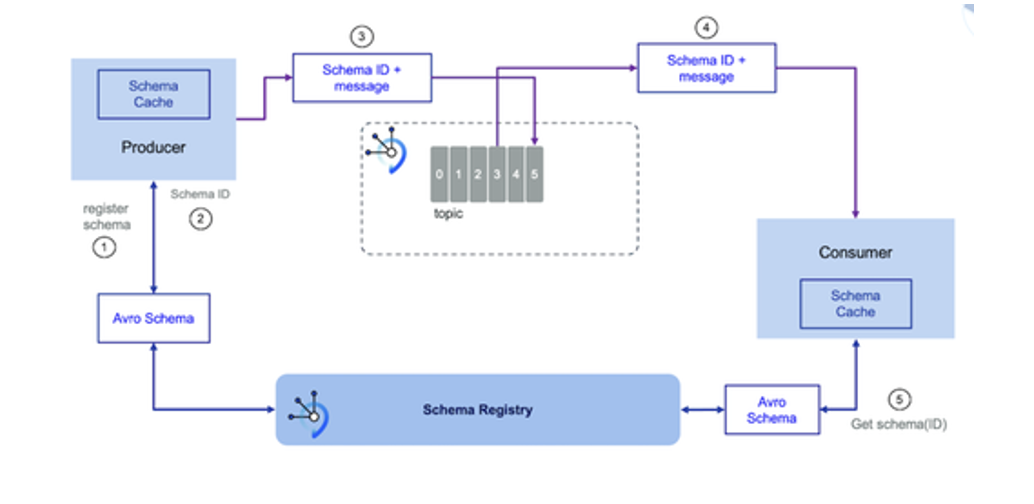
Schema ID Embedding: Typically, only a schema ID is embedded in the payload, pointing to the actual schema in the registry. This keeps the payload light and decouples schema storage from data.
Change Notification: Downstream consumers can quickly detect when a schema version changes by comparing the schema IDs.
Schema Registry vs. Protocol Buffers and Embedding Schema in Payload
Centralized Schema Management
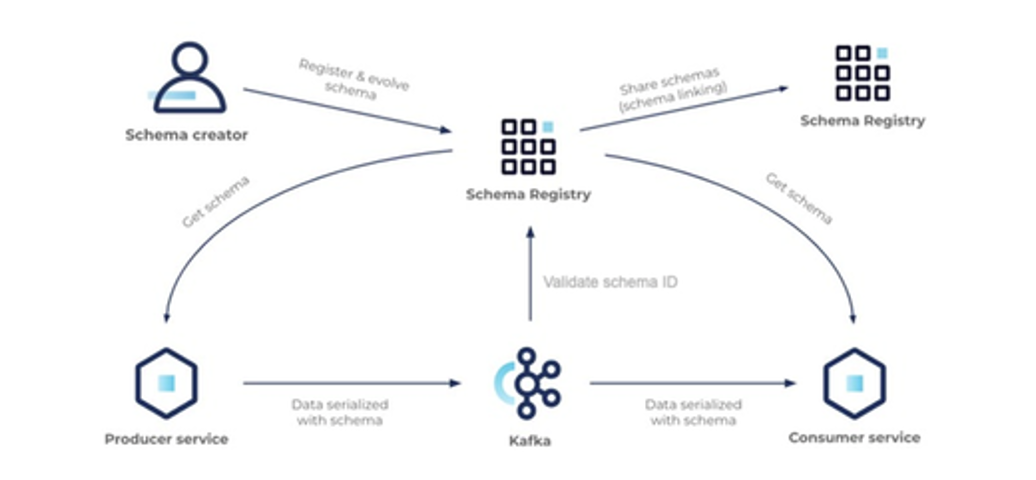
Single Source of Truth: A Schema Registry serves as a central repository for all schema definitions. This ensures that all producers and consumers reference the same schema versions, avoiding discrepancies.
Version Control: It tracks schema versions, enabling you to manage schema evolution, rollback, and enforce compatibility policies.
Lightweight Payloads
Reference by ID: Instead of embedding the entire schema in each payload, a small schema ID is included. This dramatically reduces payload size and network overhead.
Faster Processing: Smaller payloads are quicker to serialize/deserialize, and the consumers retrieve the full schema only once or cache it locally.
Dynamic Schema Discovery and Evolution
- Change Detection: With a Schema Registry, downstream consumers can easily detect when the schema has changed by comparing schema IDs. This is especially useful in environments where data producers update their schemas frequently.
Example Scenario: Consider a scenario where a producer evolves a message from schema version 1 to version 2. With a Schema Registry, the consumer sees the schema ID change. It then fetches the new schema from the registry, verifies compatibility, and adjusts processing accordingly. In contrast, with Protobuf (without a central registry), each payload might include the schema or require external synchronization, making it harder to manage dynamic changes.
Comparison: Schema Registry vs. Schema in Payload
| Aspect | Schema Registry | Schema in Payload |
|---|---|---|
| Payload Size | Minimal (only schema ID) | Large (entire schema repeated in every message) |
| Centralized Management | Yes – one source of truth for all consumers/producers | No – schemas may vary and become out-of-sync |
| Versioning & Evolution | Easy to track and enforce compatibility rules | Harder to manage; changes must be propagated across all payloads |
| Performance | Improved serialization/deserialization due to lightweight payloads | Additional overhead in parsing repeated schema definitions |
| Change Detection | Downstream systems can quickly detect schema changes via IDs | More cumbersome; need to parse each message to extract schema info |
Protocol Buffers Considerations
Protobuf and Embedded Schemas: While Protobuf is efficient and supports schema evolution, it typically relies on precompiled schema definitions. Without a centralized registry, maintaining schema consistency across multiple consumers can be challenging.
Dynamic Evolution: Schema Registry provides a dynamic mechanism where the consumer can retrieve the most recent schema. With Protobuf, any change may require a full redeployment of consumer applications if they have hard-coded schema definitions.
Benefits of Avro with Schema Registry
Avro as the default schema format provides robust support for schema evolution, compact serialization, and wide language support. Coupling Avro with a centralized Schema Registry offers significant advantages over embedding schemas in the payload or using alternatives like Protocol Buffers without a central management mechanism:
- Efficient Payloads: Only a schema ID is sent with each message.
- Centralized Control: One source of truth for schema versions and compatibility.
- Dynamic Adaptation: Consumers can detect and adapt to schema changes quickly.
- Simplified Management: Streamlined versioning, auditing, and evolution of data structures.
These benefits are critical for maintaining high-throughput, resilient, and evolvable data systems in today’s distributed architectures.
Data Modeling Styles
For comprehensive information about different data modeling styles including SCD Type 1 & 2, Star/Snowflake schemas, Data Vault 2.0, Graph modeling, and modern hybrid architectures, see the Data Modeling Styles Guide .
Schema Best Practices
Start Simple
Begin with the simplest schema that meets your needs. You can always evolve to more complex formats later.
Document Everything
Clearly document your schema, including:
- Field descriptions
- Validation rules
- Example values
- Version history
Plan for Evolution
Design schemas with evolution in mind:
- Use optional fields where possible
- Define compatibility policies
- Version your schemas
- Plan migration strategies
Validate Early
Validate data as early as possible in your pipeline to catch errors before they propagate.
Monitor Costs
Track computational costs and adjust schema choices as your data volumes grow:
- Monitor payload sizes and processing times
- Review costs quarterly
- Consider migrating to binary formats when volumes increase
- Balance performance gains against maintenance complexity
Related Topics
- Data Contracts - How schemas fit into data contracts
- ODCS - Standardized schema definition framework
- Schema Types Overview - Introduction to schema types